Countism - Tally Counter1.1.1
Publisher Description
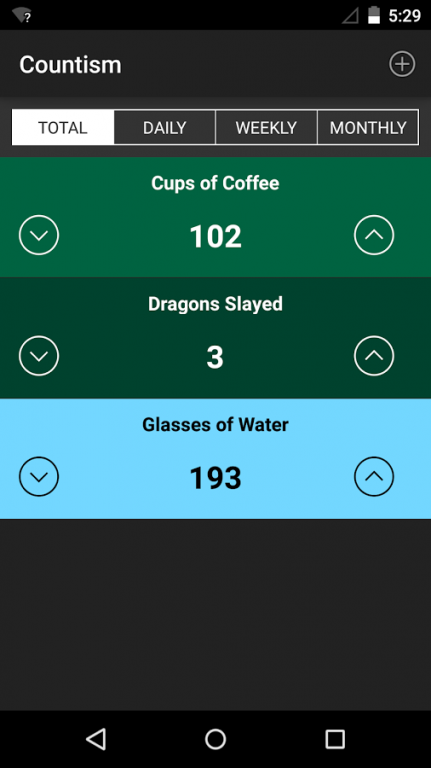
Countism is an advanced tally counter that will help you track everything that matters to you. Supports regular counters, time series data, graphs, averages, and more so you can see how you're doing and improving over time on the things that matter to you.
TRACK ANYTHING:
• Hours worked
• Glasses of Water per day
• Sodas drank
• Gym visits or workouts
• Stock/inventory counts
• Customers served
• How many times you swear
• etc...
FEATURES
• NO ADS or annoying popups (ever!)
• Unlimited counters
• No counting number limits
• Negative counts supported
• Sorting & Deleting: Press and hold on a counter to sort or delete it
• Custom count or date/time input: Press and hold up/down arrows
• Export counter data to CSV
INTUITIVE DESIGN
• Large, colorful counters
• Custom color picker to differentiate your counters
• Easy to read contrasting text and button colors for both light and dark background colors
• Time series switcher for all counters, and for individual counter views with graphs and averages
• Summarized count averages that track over time
• Clear, easy to read graphs
Countism: Track what matters. Change your life.
About Countism - Tally Counter
The company that develops Countism - Tally Counter is Actridge, LLC. The latest version released by its developer is 1.1.1.
To install Countism - Tally Counter on your Android device, just click the green Continue To App button above to start the installation process. The app is listed on our website since 2016-02-08 and was downloaded 11 times. We have already checked if the download link is safe, however for your own protection we recommend that you scan the downloaded app with your antivirus. Your antivirus may detect the Countism - Tally Counter as malware as malware if the download link to com.actridge.countism is broken.
How to install Countism - Tally Counter on your Android device:
- Click on the Continue To App button on our website. This will redirect you to Google Play.
- Once the Countism - Tally Counter is shown in the Google Play listing of your Android device, you can start its download and installation. Tap on the Install button located below the search bar and to the right of the app icon.
- A pop-up window with the permissions required by Countism - Tally Counter will be shown. Click on Accept to continue the process.
- Countism - Tally Counter will be downloaded onto your device, displaying a progress. Once the download completes, the installation will start and you'll get a notification after the installation is finished.
Program Details
System requirements
Download information
Pricing
Version History
version 1.1.1
posted on 2016-02-08
- Export counter data to CSV via email attachment (click on download icon on counter view/detail screens),- Negative counts allowed now,- Custom input of count, date, and time by pressing and holding down the up/down arrows on counters,- Fixed issue in v1.1.0 that did not display graphs on some devices
